Mobile application developed by Fuji Film for the study and analysis of Fuji Prescale pressure-sensitive films
Prescale Mobile - Analysis application for Prescale film: Overview
As described in more detail on other pages of this section, the Prescale pressure-sensitive film has the peculiarity of "coloring" in various shades of red
(magenta), which correspond to the surface contact pressure it is subjected to. The distribution and density of the developed coloration are functions of the "mapping" of the applied
phenomenon and its intensity, respectively.
The Prescale pressure-sensitive film is usually supplied with an instruction sheet, including a reference colorimetric chart, which allows for a visual
comparison to evaluate the phenomenon recorded by the Prescale film. For most applications, this method is generally considered sufficiently reliable and
accurate for assessing the results obtained. However, there may be circumstances where visual assessment is not adequate or sufficiently repeatable.
In such cases, additional requirements (typically related to qualitative checks) may call for documented measurements managed as a historical record,
serving as an internal production benchmark to monitor potential trends in the controlled production process. This enables the anticipation of issues
that may require correction within certain margins.
For the cases described, or in situations where, for study and research purposes, more in-depth analyses of the exposed Prescale films are needed, the
Prescale Mobile analysis app developed by Fuji Film Japan can be used. The Prescale Mobile app allows for the execution of numerous and varied inspection
actions to interpret the results of the Prescale films exposed to the event under study, as described in more detail in the following sections. Prescale
Mobile enables the user to photograph the exposed Prescale film, which should first be placed on a calibration sheet provided with the app. This ensures
that the app can accurately analyze the distribution and magnitude of the surface contact pressures detected by the Prescale film. Among the various features
offered by Prescale Mobile, in addition to the aforementioned analysis functionalities, is the ability to set and record different inspection modes.
The results can be directly compared with images from previous reference measurements, as well as other useful information, such as the minimum, maximum,
and average pressure values detected in the impressed area, and any differences compared to the reference image. Prescale Mobile consists of the app,
which must be installed on a compatible mobile device (see subsequent information), which is not included in the package, a case for storing and transporting
the reference calibration sheets (x2), with a usable area in A4 format, the usage license, and a brief guide for using the app.
Prescale Mobile and the related reference documentation (manual, etc.) are available only in English.
Prescale Mobile - Analysis application for Prescale film: Presentation video
Brief video (3.09 minutes) that succinctly yet effectively showcases the capabilities and features of the FujiFilm Prescale Mobile App:
Prescale Mobile - Analysis application for Prescale film: Key Features
analysis tool provided as a complete package;
ease of use with guaranteed repeatability of results;
intuitive understanding of processed results;
numerous analysis features available;
possibility of storing analysis history.
Prescale Mobile - Analysis application for Prescale film: Film acquisition
As shown in the photographic sequence below, using the Prescale Mobile app is very straightforward. Prepare the previously exposed Prescale film,
ensuring it is clean from liquids, dust, or particles. Then, correctly position the film within the reference calibration sheet (useful area A4),
also following the suggestions provided in the manual. Digitize the exposed Prescale film as an electronic image using the mobile device's camera,
aligning the capture with the four "L" references placed at the corners of the calibration sheet, and register it through the Prescale Mobile app.
Proceed with the subsequent inspections and analyses.
correctly acquired image (capture aligned with the 4 "L" references placed at the four corners;
incorrect acquisition (presence of shadows on the area of interest being read);
incorrect acquisition (presence of the dark edge of the calibration sheet holder).
Prescale Mobile - Analysis application for Prescale film: application usage
In the image below (which can be enlarged by clicking on it), the correct workflow is shown, following which will enable a proper analysis of the Prescale
film under examination using Prescale Mobile:
The following shows the individual steps of the inspection workflow, explained in more detail:
ACTIVATING A NEW INSPECTION CHECK
Select the + sign in the Inspection menu to proceed to the Add Inspection screen.
Set the type of inspection (for detailed information on settings, refer to the user manual) by selecting the necessary options.
Select OK to save an inspection (if the inspection type is set to Superimposition, a previously defined operational area is required).
REGISTERING THE EXPOSED FILM
Select the work area outlined by the chosen reference image on the Add Inspection screen.
Select Use Photo to define the reference work area (boundary sample registration); if necessary, repeat the image capture using the
“Re-capture” feature.
ACQUIRING PRESCALE FILM
Enter the ambient temperature and humidity recorded during the test for which the Prescale film was used for inspection.
Select Individual Inspection or Layering Inspection from the Inspection menu screen, then tap the name of the inspection to save the image.
Subsequently, capture (photo) the Prescale film positioned on the calibration sheet.
VERIFYING ANALYSIS RESULTS
In this step, data such as analysis images and pressure values will be displayed (select Result Screen).
Then, select OK or No good for the analysis results.
Select Yes on the confirmation screen, and then record the judgment result on the screen.
The color bar and colors in the image will indicate the level of correspondence between the images.
SAVING INSPECTION
Select History from the Inspection menu screen.
Save the results of the completed inspection.
Select any additional inspection results to review.
Delete any previous inspections that are no longer needed.
Prescale Mobile - Analysis application for Prescale film: functions
As detailed in the reference literature, the functionalities offered by the Prescale Mobile app are numerous and genuinely useful.
Below is a brief description of these features, intended to present their purpose and usage methods.
MEASUREMENT OF SURFACE PRESSURE
Different inspection areas of the desired size can now be specified (up to six positions), and for each one, the relevant inspection
information can be viewed within these areas.
COMPARISON
You can view the reference sample images and inspection images side by side, making it easy to observe any changes or trends.
*This feature is only available for individual inspections.
SUPERIMPOSITION
Reference limit samples and inspection images can be superimposed to show the differences in pressure detected between the two images.
The color bar on the left indicates the degree of conformity between the pressure in the reference sample and the inspection images.
*This feature can only be used with superimposition inspection.
AUTOMATIC JUDGMENT
t is automatically judged based on the preset threshold value or threshold range, and the application will independently determine what can
be considered a Pass o Fail, depending on the settings selected by the user for the Auto-Judgment feature.
DATA ARCHIVING AND EXPORT
Data can be stored and historical data (measurement history) can be referenced at any time. You can export data from the inspection action for further
analysis to iCloud or directly to a PC (with iTunes previously installed). Measurement results are in CSV format and can be imported into Excel™.
Prescale Mobile - Analysis application for Prescale film: Measured Parameters
Clicking on the image above will allow you to view it in an enlarged format;
Prescale Mobile - Analysis application for Prescale film: Technical Specifications
denomination: Fuji Film Prescale Mobile App for Prescale Film (*);
model: Prescale Mobile
functionality::
definition of inspection analysis;
acquisition (mobile camera) of Impressed Film;
analysis of surface pressure distribution;
measurement of minimum, maximum, and average pressure values;
comparison and overlay functions with reference images;
automatic judgment of results (pass, fail);
archiving and exporting results
usable area on calibration sheet:(*): A4 format (297 x 210 mm) (**);
package contents: calibration sheets (2x) with protective case, quick manual, usage license. Prescale Mobile App (to be downloaded);
package language: exclusively in english (mobile application, manual, etc.).
(*) Prescale Mobile can only be used with the following Prescale fields: 5LW, 4LW, LLLW, LLW, LW, MW, and HT-LLW.; (**) In the near future, Fuji Film plans to extend the usable area to A3 size (420 x 297 mm).;
Prescale Mobile - Analysis application for Prescale film: Reference Documentation


You are here: products · Prescale Mobile Description: Mobile application for analyzing Fuji Prescale pressure-sensitive film.
Prescale Mobile
Mobile application developed by Fuji Film for the study and analysis of Fuji Prescale pressure-sensitive films
Prescale Mobile - Analysis application for Prescale film: Overview
As described in more detail on other pages of this section, the Prescale pressure-sensitive film has the peculiarity of "coloring" in various shades of red (magenta), which correspond to the surface contact pressure it is subjected to. The distribution and density of the developed coloration are functions of the "mapping" of the applied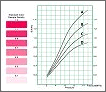 phenomenon and its intensity, respectively.
The Prescale pressure-sensitive film is usually supplied with an instruction sheet, including a reference colorimetric chart, which allows for a visual
comparison to evaluate the phenomenon recorded by the Prescale film. For most applications, this method is generally considered sufficiently reliable and
accurate for assessing the results obtained. However, there may be circumstances where visual assessment is not adequate or sufficiently repeatable.
In such cases, additional requirements (typically related to qualitative checks) may call for documented measurements managed as a historical record,
serving as an internal production benchmark to monitor potential trends in the controlled production process. This enables the anticipation of issues
that may require correction within certain margins.
phenomenon and its intensity, respectively.
The Prescale pressure-sensitive film is usually supplied with an instruction sheet, including a reference colorimetric chart, which allows for a visual
comparison to evaluate the phenomenon recorded by the Prescale film. For most applications, this method is generally considered sufficiently reliable and
accurate for assessing the results obtained. However, there may be circumstances where visual assessment is not adequate or sufficiently repeatable.
In such cases, additional requirements (typically related to qualitative checks) may call for documented measurements managed as a historical record,
serving as an internal production benchmark to monitor potential trends in the controlled production process. This enables the anticipation of issues
that may require correction within certain margins.
 For the cases described, or in situations where, for study and research purposes, more in-depth analyses of the exposed Prescale films are needed, the
Prescale Mobile analysis app developed by Fuji Film Japan can be used. The Prescale Mobile app allows for the execution of numerous and varied inspection
actions to interpret the results of the Prescale films exposed to the event under study, as described in more detail in the following sections. Prescale
Mobile enables the user to photograph the exposed Prescale film, which should first be placed on a calibration sheet provided with the app. This ensures
that the app can accurately analyze the distribution and magnitude of the surface contact pressures detected by the Prescale film. Among the various features
offered by Prescale Mobile, in addition to the aforementioned analysis functionalities, is the ability to set and record different inspection modes.
The results can be directly compared with images from previous reference measurements, as well as other useful information, such as the minimum, maximum,
and average pressure values detected in the impressed area, and any differences compared to the reference image. Prescale Mobile consists of the app,
which must be installed on a compatible mobile device (see subsequent information), which is not included in the package, a case for storing and transporting
the reference calibration sheets (x2), with a usable area in A4 format, the usage license, and a brief guide for using the app.
Prescale Mobile and the related reference documentation (manual, etc.) are available only in English.
For the cases described, or in situations where, for study and research purposes, more in-depth analyses of the exposed Prescale films are needed, the
Prescale Mobile analysis app developed by Fuji Film Japan can be used. The Prescale Mobile app allows for the execution of numerous and varied inspection
actions to interpret the results of the Prescale films exposed to the event under study, as described in more detail in the following sections. Prescale
Mobile enables the user to photograph the exposed Prescale film, which should first be placed on a calibration sheet provided with the app. This ensures
that the app can accurately analyze the distribution and magnitude of the surface contact pressures detected by the Prescale film. Among the various features
offered by Prescale Mobile, in addition to the aforementioned analysis functionalities, is the ability to set and record different inspection modes.
The results can be directly compared with images from previous reference measurements, as well as other useful information, such as the minimum, maximum,
and average pressure values detected in the impressed area, and any differences compared to the reference image. Prescale Mobile consists of the app,
which must be installed on a compatible mobile device (see subsequent information), which is not included in the package, a case for storing and transporting
the reference calibration sheets (x2), with a usable area in A4 format, the usage license, and a brief guide for using the app.
Prescale Mobile and the related reference documentation (manual, etc.) are available only in English.
Prescale Mobile - Analysis application for Prescale film: Presentation video
Brief video (3.09 minutes) that succinctly yet effectively showcases the capabilities and features of the FujiFilm Prescale Mobile App:
Prescale Mobile - Analysis application for Prescale film: Key Features
Prescale Mobile - Analysis application for Prescale film: Film acquisition
As shown in the photographic sequence below, using the Prescale Mobile app is very straightforward. Prepare the previously exposed Prescale film, ensuring it is clean from liquids, dust, or particles. Then, correctly position the film within the reference calibration sheet (useful area A4), also following the suggestions provided in the manual. Digitize the exposed Prescale film as an electronic image using the mobile device's camera, aligning the capture with the four "L" references placed at the corners of the calibration sheet, and register it through the Prescale Mobile app. Proceed with the subsequent inspections and analyses.
correctly acquired image (capture aligned with the 4 "L" references placed at the four corners;
incorrect acquisition (presence of shadows on the area of interest being read);
incorrect acquisition (presence of the dark edge of the calibration sheet holder).
Prescale Mobile - Analysis application for Prescale film: application usage
In the image below (which can be enlarged by clicking on it), the correct workflow is shown, following which will enable a proper analysis of the Prescale film under examination using Prescale Mobile: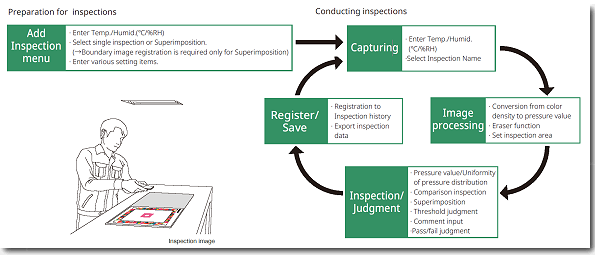 The following shows the individual steps of the inspection workflow, explained in more detail:
ACTIVATING A NEW INSPECTION CHECK
Select the + sign in the Inspection menu to proceed to the Add Inspection screen.Set the type of inspection (for detailed information on settings, refer to the user manual) by selecting the necessary options.
Select OK to save an inspection (if the inspection type is set to Superimposition, a previously defined operational area is required).
REGISTERING THE EXPOSED FILM
Select the work area outlined by the chosen reference image on the Add Inspection screen. Select Use Photo to define the reference work area (boundary sample registration); if necessary, repeat the image capture using the “Re-capture” feature.ACQUIRING PRESCALE FILM
Enter the ambient temperature and humidity recorded during the test for which the Prescale film was used for inspection.Select Individual Inspection or Layering Inspection from the Inspection menu screen, then tap the name of the inspection to save the image.
Subsequently, capture (photo) the Prescale film positioned on the calibration sheet.
VERIFYING ANALYSIS RESULTS
In this step, data such as analysis images and pressure values will be displayed (select Result Screen).Then, select OK or No good for the analysis results.
Select Yes on the confirmation screen, and then record the judgment result on the screen.
The color bar and colors in the image will indicate the level of correspondence between the images.
SAVING INSPECTION
Select History from the Inspection menu screen.Save the results of the completed inspection.
Select any additional inspection results to review.
Delete any previous inspections that are no longer needed.
Prescale Mobile - Analysis application for Prescale film: functions
As detailed in the reference literature, the functionalities offered by the Prescale Mobile app are numerous and genuinely useful. Below is a brief description of these features, intended to present their purpose and usage methods.
MEASUREMENT OF SURFACE PRESSURE
Different inspection areas of the desired size can now be specified (up to six positions), and for each one, the relevant inspection information can be viewed within these areas.COMPARISON
You can view the reference sample images and inspection images side by side, making it easy to observe any changes or trends.*This feature is only available for individual inspections.
SUPERIMPOSITION
Reference limit samples and inspection images can be superimposed to show the differences in pressure detected between the two images. The color bar on the left indicates the degree of conformity between the pressure in the reference sample and the inspection images.*This feature can only be used with superimposition inspection.
AUTOMATIC JUDGMENT
t is automatically judged based on the preset threshold value or threshold range, and the application will independently determine what can be considered a Pass o Fail, depending on the settings selected by the user for the Auto-Judgment feature.DATA ARCHIVING AND EXPORT
Data can be stored and historical data (measurement history) can be referenced at any time. You can export data from the inspection action for further analysis to iCloud or directly to a PC (with iTunes previously installed). Measurement results are in CSV format and can be imported into Excel™.Prescale Mobile - Analysis application for Prescale film: Measured Parameters
Clicking on the image above will allow you to view it in an enlarged format;
Prescale Mobile - Analysis application for Prescale film: Technical Specifications
(*) Prescale Mobile can only be used with the following Prescale fields: 5LW, 4LW, LLLW, LLW, LW, MW, and HT-LLW.;
(**) In the near future, Fuji Film plans to extend the usable area to A3 size (420 x 297 mm).;
Prescale Mobile - Analysis application for Prescale film: Reference Documentation
Prescale Mobile - Analysis application for Prescale film: Minimum Requirements
To fully utilize the features offered by the Prescale Mobile application, it must be installed on a mobile device with the following specifications:
(*) The mobile device is not included with the Prescale Mobile package and must be purchased separately.;
©1998-2024 Spare sas
In preparing this document, the utmost care has been taken to ensure that the content accurately reflects the characteristics of the described product. However, despite these efforts, Spare sas cannot be held responsible or liable for any inaccuracies. Furthermore, in the context of ongoing product development and improvement, please note that the information provided may not be up-to-date with the latest version, as manufacturers reserve the right to withdraw or modify their product documentation at any time without notice. Consequently, it is advised to verify the accuracy and currency of the information at the time of purchase.